Showing posts with label Review Product. Show all posts
Thursday, August 27, 2009

Nintendo Game Boy Advance SP White Console Review


A completely redesigned version of the popular Game Boy Advance, this system has a new illumination feature and a sleek, flip-screen design -- making it the most distinctively stylish, compact and portable Game Boy system ever.


The rechargeable lithium-ion battery takes just 3 hours to fully recharge, and its good for 10 hours of continuous play with the light on and 18 hours of play with the light turned off. Game Boy Advance SP is backward compatible, allowing you to use virtually all games previously released for the Game Boy® line.

Specification:

Product MPN
MPN : 44100

Key Features
Console Type : Handheld
Platform : Game Boy Advance SP
Color : White
Processor : 16.78 MHz Sharp ARM7TDMI
Display : LCD TFT (Active Matrix)
Gaming Type : LAN Gaming

Processor
Processor type : Sharp ARM7TDMI
Processor Speed : 16.78 MHz

Memory
Installed RAM : 256 KB
Installed Cache Memory : 32 KB
RAM technology : WRAM

Display
Display Type : LCD TFT (Active Matrix)
Screen Size : 2.9 in.
Max. Resolution : 240 x 160

Graphics
Max. Number Of Colors : 32,768 Colors

Audio
Audio Support : Stereo

Technical Features
Communication Type : Serial Cable Proprietary
Expansion Slots : Game Cartridge Slot
Main Controls : 4 Way Cross Keypad A/B/X/Y Buttons
Input / Output Ports : 1 x Game Boy Advance link connector 1 x Game Boy Advance SP multi-access port

Battery
Battery Run Time : 18 Hours
Battery Type : Rechargeable Lithium-ion

Dimensions
Height : 3.2 in.
Depth : 0.97 in.
Width : 5.69 in.
Weight : 0.31 lb.

Miscellaneous
Supplied Accessories : AC Adapter
Release Date : March, 2004
Product ID : 55496922

source
Monday, April 20, 2009

Gigabyte Radeon HD 4850 1GB Passive Review


Within the last year or so, Gigabyte has moved their graphics card production to more and more custom models. In this review we take a look at Gigabyte's new HD 4850 1GB which is not only one of the few 1GB HD 4850 cards on the market but is also passively cooled with a unique "Multi Core" heatsink.


Manufacturer Product Page: GIGABYTE GV-R485MC-1GI
Product Number: GV-R485MC-1GI
TechWiki Info: Gigabyte Radeon HD 4850 1GB
Availability: Now
Warranty: 3 Years
Price: Click here to compare prices


We all know the HD 4850 as the little brother of the faster HD 4870 and the distant sibling of the new HD 4890 but while ATI’s lineup has been expanding, the runt of the RV770 litter has been maturing. While reference-based versions of the HD 4850 still exist and remain quite popular, ATI has been pushing their board partners to come up with new and innovative ways of marketing the HD 4850. Some companies left well enough alone and continue to sell a lone HD 4850 512MB SKU but many others have given the design a frontal lobotomy. We now have HD 4850 cards which are pre-overclocked or sport non-reference cooling designs or even incorporate a custom PCB for up to 1GB worth of memory. Some even incorporate a little of everything and really push the limits. It is one of these more extreme cards we will be looking at today.

They say variety is the spice of life and companies like Gigabyte with their HD 4850 1GB have taken that saying to heart. While releasing stock cards is fine and dandy, in order to get people talking about your product you need to find something for them to talk about, something that stands out. In the past Gigabyte rested on their laurels, seemingly content to ply their trade in the mom and pop shops with rebadged reference cards but lately, things have really changed. Not only does the GV-R485MC-1GI sport slightly increased clocks and a 1GB framebuffer but it is also equipped with a passive cooling system. As you will see as the review goes on, the boys over at Gigabyte have really stepped up to the plate with their take on the HD 4850 and have produced a card to be proud of.

If there is one thing we would like to mention from the getgo it is the fact that there is precious little information available about this particular graphics card. While pricing seems to be well within our expectations (between $10 to $20 USD more than the reference versions), trying to find accurate specifications for it is a lesson in futility. Unfortunately, Gigabyte’s site has every bit of information you could possibly need…except the clock speeds the vast majority of us will be looking for when choosing whether or not to buy this card. While we will go into a little more detail about actual speeds within the review, their omission from Gigabyte’s site is puzzling.

Where these custom cards are usually granted limited edition status, it seems that the GV-R485MC-1GI is widely available from Canadian retailers for about $210CAD. That price should definitely cause quite a few silent PC enthusiasts to sit up and take notice. On the other hand, Gigabyte’s 3 warranty is pretty much in line with other ATI partners but pales in comparison to XFX’s Lifetime Warranty even if 3 years is longer than the majority of you will keep this card.

From the outside looking in, Gigabyte’s HD 4850 1GB seems to offer quite a bit in a relatively inexpensive package. Can it deliver? Let’s find out.


Buy Now : Radeon HD 4850 PCIE2.0 1GB GDDR3 Dvi-i Tv Out


source : hardwarecanucks.com

Sunday, April 12, 2009

Acer AspireRevo, Desktop- the size of Book


Acer has released a PC, on Tuesday (07 / 4) of the performance class will bring the PC into a PC-based Atom processor. Acer AspireRevo, is the first Atom-based PC that uses Nvidia chipset Ion, a package with the graphics card Nvidia GeForce 9400M, a graphics card that is used in the 13 inch Apple MacBook and MacBook Air. Acer AspireRevo has seukuran Hardcover book form, with the Nvidia graphics card to combine with the processor Intel Atom.


To design, Acer AspireRevo power more sparingly, but also work more slowly rather than chip architecture Intel Core 2 Duo. While for external features Acer AspireRevo very little, although a little thick compared to the size of a laptop, but small in size, such as similar books. Internally, devices AspireRevo Acer akan test Nvidia graphics card is in, because the previous pair netbook with Atom processor and graphics card Nvida able to give a better performance than the only Intel chipsets with the Atom.

"AspireRevo is a device that is suitable for the room because the Nvidia graphics Ion provides a brilliant experience, with digital photos, watch videos, play games and family-friendly." Said Gianpiero Morbello, corporate vice president for Acer.

Nvidia's ability to record AspireRevo based Ion:

* Can be run on Windows Vista Home Premium
Quality * 1080p HD video with 7.1 audio
* Own popular games like Spore, Call of Duty 4, and Sim City 5
* DirectX 10 Graphics display with advanced
* Acceleration and video transcoding using the Nvidia CUDA technology
* Desktop-based Nvidia Ion is sold with a price below the estimated $ 300

source : beritanet
> swap

Friday, April 10, 2009

Samsung NC20 U.S. Version Reviewed


Some might argue that Samsung's NC20 isn't really a netbook, with its spacious 12.1-inch screen and full-size, notebook-style keyboard. But its VIA Nano processor, long battery life, lack of an optical drive, and basic selection of ports perfectly fit the netbook mold. Whatever you call it, the NC20 does an excellent job bridging the gap between traditional netbooks and notebooks, with the price, battery life, and most of the portability of a netbook, combined with the comfort and usability of a larger ultraportable laptop....


At 1.2x11.5x8.5 inches and 3.3 pounds, the NC20 lacks some of the toss-in-a-shoulder-bag convenience of the 9- and 10-inch netbooks, but it’s still extremely portable. In fact, it's only 1.2 inches wider and deeper than Samsung's 10-inch NC10 and the same thickness. The chassis of the North American model is glossy black on the outside and flat black on the inside, with chrome trim around the edges. (Overseas, the NC20 is offered in white.)

The standout feature of the NC20 is its bright 12.1-inch, 1,280x800 screen. Text is crisp and is rendered at about the same size as on a 1,024x600 netbook. The extra screen resolution makes a huge difference in usability, requiring less scrolling when viewing Web sites, offering more room for toolbars when using productivity applications, and providing better compatibility with games. The panel has a glossy finish, so glare and reflections might be an issue in some lighting conditions.


Accommodating the large screen gave Samsung room to include a full-size keyboard that's extremely comfortable for touch typing. The layout is very good overall, with a couple of minor oddities: The space bar is slightly truncated to make room for the tilde key, which is dropped to its left, and the Windows logo key sits on the right side of the space bar. The 3.1-inch (diagonal measurement) touch pad is much larger than what most netbooks offer, making for comfortable, accurate pointer control. A single rocker button allows you to press on the left or the right; it's comfortable to use, but we prefer distinct left and right buttons.

The rest of the specs are typical netbook fare: Windows XP Home, 1GB of RAM (though it’s expandable to 2GB, which we appreciate), a 160GB hard drive, VGA output, 802.11b/g wireless and 10/100Mbps Ethernet, Bluetooth 2.0, a trio of USB 2.0 ports, and headphone and microphone jacks. There's also a 1.3-megapixel Webcam and an SD/MultiMediaCard memory slot.

What's not typical is the processor. The NC20 is the first netbook to use VIA's new 1.3GHz Nano U2250 processor. This new CPU is much more competitive, performance-wise, with the Intel Atom than the anemic VIA C7-M used in the HP 2133 Mini-Note. On most of our tests, the Nano’s performance fell squarely between the Intel Atom N270 and the newer N280 model. For instance, on Cinebench 9.5, the NC20 scored 141, compared with 134 for the N270-equipped Acer Aspire One AOD150 and 148 for the N280-equipped Asus Eee PC 1000HE. The HP 2133, which uses the older VIA C7-M processor, by comparison, scored just 23 on this test. It managed a strong Cinebench 10 score of 882.

The NC20 fell a bit behind the Atom crowd on our Windows Media Encoder test, however, taking 29 minutes and 16 seconds, compared with 28:21 for the Aspire One and 22:11 for the Eee PC 1000HE. On the other hand, it left the Atom netbooks in the dust on our iTunes encoding test, finishing in 13 minutes and 58 seconds, versus 21 minutes for the Aspire One and 17:37 for the Eee PC 1000HE. In fact, this iTunes score is the best we’ve ever seen for a netbook—period. Overall, the general performance feels about the same as on the Atom notebooks we've used. There is one exception: The NC20 feels more sluggish than Atom-powered netbooks if you try to work while a background task is using 100 percent of your CPU power, because the Nano lacks the Hyper-Threading feature that helps the Atom remain responsive while multitasking.

The NC20's Chrome9 graphics proved slightly faster than the Intel 945 graphics found on most netbooks. The system scored 132 on our 3DMark06 test, compared with 92 for the Intel 945-equipped Eee PC 1000HE—the fastest score among netbooks with the exception of the Asus N10Jc, which had switchable discrete graphics. That said, the 3D capabilities are still very basic, suitable for older games only. Video playback of standard-definition DVD video and high-quality YouTube clips is smooth, but the NC20 can't keep up with 720p video files. Audio clarity is very good, though volume could be a bit louder.


On our Wi-Fi video streaming test, battery life was an impressive 4 hours and 50 minutes. While that's just over an hour shy of the record-holding Asus Eee PC 1000HE, it's almost an hour longer than the other 12-inch netbook we tested, the Dell Mini 12. The North American NC20 ships with a 5,900mAH six-cell battery, offering better runtime than the 5,200mAH battery found on the overseas model.

Samsung includes a three-month trial version of McAfee Security Center, the Samsung Recovery Solution backup software, and a variety of utilities for managing power settings, hotkeys, and other system settings.

At this particular moment in time, the choice is between the $549 NC20 and the $399 1000HE. While we loved the 1000HE for its long battery life, excellent performance, and comfortable keyboard, it’s still limited by its 10-inch screen with 1,024x600 resolution (although it does offer two other resolutions that cheat the system a bit). We like the NC20 for its larger screen, better resolution, and still impressive performance—especially with iTunes and graphics—and battery life. The price is a sticking point, however, at $150 more than the 1000HE. Overall, its VIA Nano processor proves a worthy challenger to Intel's Atom, competition that's likely to make the netbook playing field even more interesting as 2009 progresses.
Check out our slideshow!
Price (at time of review): $549.99

source : computershopper
Thursday, April 9, 2009

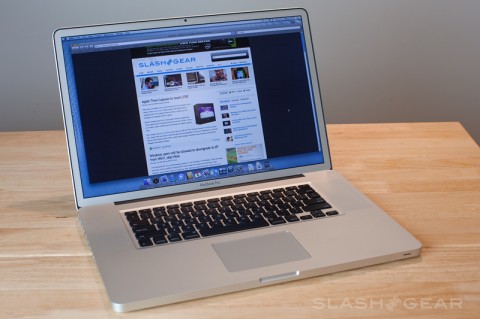
Apple MacBook Pro 17-inch Review

The 17-inch MacBook Pro was the last of the Apple notebook range to get a unibody update, but for those looking for superlative media editing and general processing grunt it more than delivers. Apple shipped over the new MacBook Pro just after it launched, and we’ve been spending the last few weeks getting to grips with the new notebook and putting it through its paces. After the cut, anti-glare screens, NVIDIA’s GeForce 9600M and portability from the thinnest, lightest 17-incher around.


For this particular MacBook Pro review unit we opted for the anti-glare LCD display. According to Apple the anti-glare treatment process is almost exactly the same as the standard glossy screen: the coating is applied instead of the final, high-gloss glass panel. Our experience suggests that it completely eliminates glare, and is well worth the $50 upgrade cost.

The quality of the display is already making us wonder how we’ll live without it once Apple demand the review unit back. It’s the only MacBook around on which you can natively edit 1080p high-definition video, and our tests show that the processor and graphics readily keep up their side of the bargain. The basic model comes with a 2.66Ghz Intel Core 2 Duo CPU (2.93GHz is a $300 option), 4GB of DDR3 RAM (8GB is $1,000), a 320GB 5,400rpm hard-drive (7,200rpm or up to 256GB SSDs are options) and an 8x SuperDrive DVD burner, plus switchable NVIDIA graphics.

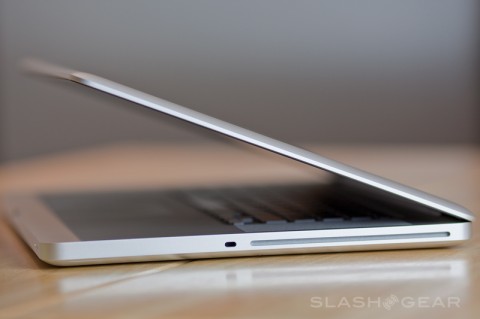
It’s also one of the most attractive large-screen notebooks we’ve come across. In the metal, the unibody chassis and broad widescreen display are gorgeous, and it manages to rank as the lightest and thinnest 17-inch notebook around. “Light” is a relative term, obviously; at 6.68lbs we’ve happily taken it to press events like CTIA, where the Pro crunched through 12+ videos a day on-site without coming up for air, but running around town the 13-inch MacBook (at two-thirds the weight) is more likely to find its way into our bag.


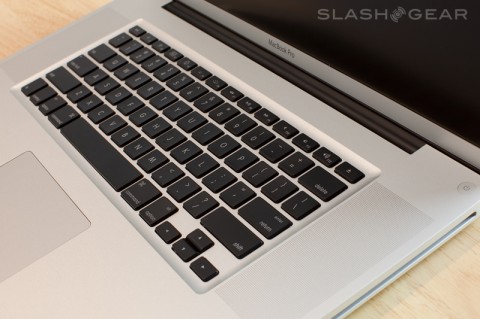
The keyboard, trackpad and overall design are the same as the 15-inch MacBook Pro, which means backlit keys, multitouch and gesture support, and sleek unibody design respectively. We’d point you back at our review of the 15-incher for full details. Where the 17-inch version differs most significantly is in the screen, the processor/graphics grunt, and the battery, and that’s what we’ll be concentrating on here.

Based on our experience with this anti-glare display, we wish Apple would backtrack and offer it as an option on the rest of the MacBook Pro range. It really does make a huge difference in terms of usability. Where we might start splitting hairs is in viewing angles; 140/120 degree angles are standard for most notebook displays, but the HP DreamColor 8730w notebook - also a graphics powerhouse - manages 160/120 degrees and the 17-inch panel on the Pro makes the difference more noticeable than on the smaller machines in the range.

As for power, we loaded up Photoshop CS4 and tested the 17-inch Pro against its 15-inch counterpart (2.4GHz, 4GB RAM, 320GB 5,400rpm HDD); in a Retouch Artist speed test the larger notebook finished in 38.9s while the smaller took 53.9s. The Intel Core 2 Duo 2.94GHz T9800 plus 8GB of RAM of our review unit is obviously faster than anything the 15-inch MacBook Pro could manage.

We also pit the 17-inch Pro against a Windows heavyweight, the HP HDX 18. Another desktop replacement (this time with an 18-inch display and roughly 9lb weight), the HDX 18 has an Intel Core 2 Duo P8400 processor running at 2.27GHz, with 4GB of RAM . In Geekbench 64-bit the HP scored 3297 overall, compared to the Apple machines’ overall score of 4401; in fact, it lapsed behind in all categories bar memory bandwidth performance (the HP scored 2152, the Apple 1822), with the MacBook Pro notching up almost double the processor floating point performance (6293 versus 3362).

It’s worth noting that, when in the midst of heavy image and video processing, the Pro gets noticeably hot (though never to the point of system instability); the rest of the time it feels no different to the 15-inch version. Overall, this is a dual-core notebook that really lives up to its “desktop replacement” billing.


As for battery life, let’s just say we were dubious about Apple’s runtime claims when the 17-inch MacBook Pro was announced. Battery life is quoted at up to 8hrs with wireless switched on and performing basic tasks with a custom Apple script (50-percent brightness, WiFi web browsing, text editing). Then expect that figure to halve if you’re watching a DVD at 50-percent brightness. Switching from the low-power GPU to the higher-performance 9600M GT (which requires you to log out and then back in again, closing whatever apps are running) will cut total time down to 7hrs, go the claims.

In our own tests, using the GeForce 9400M GPU and performing basic tasks like browsing over WiFi, watching video and tinkering with photos netted us close to 4 hours 45 minutes of runtime. Switching to the 9600M and going about the same tasks saw that cut down to around 4 hours. The latter result is a little misleading, however; if you’re really making the most of the higher-performance GeForce GPU - i.e. some serious video editing and processing - you should expect to see that figure hammered down. Nonetheless, given the specifications and the MacBook Pro’s capabilities, these are impressive runtime figures, even if they fall well short of what you might be led to believe from Apple’s marketing hyperbole.

Apple are particularly proud of their eco-credentials with the unibody MacBook Pro; the battery is supposedly good for 1,000 full recharge cycles - equivalent to five years of service - and it requires just 95W to run. Since it’s non-user-replaceable that 1,000 cycles figure will be an important one: taking it in to your local Apple store for a switch out will cost $179. We missed being able to slot in a second pack for on-the-go use while at CTIA, as we were able to with our 15-inch MacBook Pro, but the overall runtime and reduction in size were perhaps more welcome when facing a day full of carrying the laptop.


For day to day use, even though the 17-inch MacBook Pro may be the lightest and thinnest laptop in its segment, it’s still tough to sport around tradeshows and between coffee shops. It’s definitely a desktop replacement, more suited to occasional travel to visit clients, or make short trips. Those who travel frequently would be better served by 15-inch model, unless they really do need to perform heavy-duty HD video editing on the move.

If you are just such a user, though, and you’re hungry for the extra screen size (and the non-glare option), the 17-inch MacBook Pro is unlikely to disappoint. Time will tell whether Apple’s battery predictions pan out, and - starting from $2,799 and, when maxed out with a 256GB SSD, hitting $4,899 - the price certainly won’t be confused for a budget option, but it’s an incredible workstation with the power to back up its promises. We’re just hoping Apple hear the positive feedback and roll the non-glare display coating option down to the smaller models in the range.

source :techblips.dailyradar

Tuesday, March 24, 2009

Samsung launches N310 10-inch netbook


Another week, another small, lightweight and affordable laptop comes tearing out of the traps. The Samsung N310 sports a 10.1-inch screen and "large size" keyboard but weighs just 1.23kg and has a battery that keeps on rockin' for up to five hours.

Samsung has drafted in Japanese designer Naoto Fukasawa to style the N310, and this collaboration has resulted in a curvy, cutesy shape as well as, according to Samsung, a casing that boasts "amazing strength and superior reliability".

The processor is an Intel Atom and Windows XP Home comes as standard, but Samsung hasn't revealed many of the tech specs just yet. On the feature front there's a 1.3-megapixel webcam built in, as well as a 3-in-1 memory card reader, three USB ports and optional Bluetooth 2.0+EDR.

No price details just yet, but the N310 will be on sale in May.

Essentials
Samsung N310
Price: £TBA
On sale: May
Contact: Samsung


source : stuff