When a new OS upgrade costs $29, you can be forgiven for thinking of it as a service pack. Such may appear to be the case with Mac OS X 10.6, aka Snow Leopard, which Apple has positioned as an under-the-hood upgrade whose new capabilities won't be so obvious to users, and thus not worth the usual $129.
I agree with that price assessment (if only Microsoft had made the same judgment about Windows 7), but I don't agree that what Snow Leopard offers resides merelyunder the hood. Instead, it provides many enhancements and some new features that Mac users of all persuasions will really like. (Note: The $29 upgrade price is for Leopard users; if you have an older Mac OS X version, it'll cost you $169 to upgrade.)
Much of Snow Leopard's focus has been internal. For example, Apple has revamped the kernel, included apps, and much of the OS itself to be 64-bit (to allow virtual addressable memory of 16 exabytes and physical addressable memory of more than 32GB). But until apps are rewritten for 64-bit and the new Mac models support that kind of memory, there's little immediate benefit -- ditto for multicore enablement in the Grand Central Dispatch engine. But the revamped QuickTime X and Java engines should result in faster processing of streaming media and Java applets (such as on Web sites).
Putting aside these important but long-term changes, here are Snow Leopard's most immediately beneficial new features and enhancements.
1. ActiveSync and Exchange 2007 support
Following in the footsteps of the iPhone, Snow Leopard makes these Microsoft technologies native to the OS. That means Apple's e-mail, calendar, and contacts apps work just peachy with Exchange 2007 server, giving users the same capabilities as Microsoft Entourage but with the better-designed, less-memory-intensive apps -- Mail, iCal, and Address Book -- included in OS X.
2. Exposé integration in the Dock
The Mac OS X Dock makes it easy to access applications, open documents, and common folders, a concept Windows 7 is stealing in its retooled taskbar. Open documents are even more easily accessed in Snow Leopard, thanks to the integration of Exposé. Now when you click and hold an app icon in the Dock, you get preview windows for each of its open documents, allowing you to switch easily among them or to close them, all without having to clutter your screen with document windows. I never cared much for Exposé in its traditional role (providing hot corners and shortcuts to open application windows), but I love the Dock-integrated Exposé functionality that Snow Leopard adds.
3. Automatic location detection
When you travel, it's easy to get mixed up as to when your appointments are, since your computer is still in your "home" time zone, and you have to mentally calculate the current time when looking at the calendar or clock. Sure, you can change the time zone in the Date & Time system preference, but it's easy to forget. So Snow Leopard changes the time zone for you automatically (if you set that as the default behavior), using Wi-Fi mapping to figure out where you are -- you will need to be connected to a Wi-Fi access point or router. iCal can also be set to adjust the times to the current time zone automatically, so your calendar always reflects the current times.
4. The new Preview is more like Adobe Reader
I have nothing against Adobe Reader, but I love that Preview now can open multiple PDF documents, display their contents as contact sheets, and show thumbnails of pages in a sidebar for easy navigation. In other words, it works a lot like Adobe Reader. That's one fewer app to launch -- and since Preview loads much faster than Reader, I can get to my PDFs' contents much faster now.
5. Movie and screencast recording
Snow Leopard takes the formerly $35 QuickTime Pro and makes it a standard, free app in Mac OS X. That means you can record movies and -- great for many marketing, education, and Web professionals -- screencasts from your Mac with no additional software.
6. Systemwide automatic text replacement
Automatic text substitution as you type is nothing new; Microsoft Word has had it for more than a decade. But Snow Leopard lets you specify such substitutions via the Keyboard system preference, so you have a common set of substitutions available to all applications. Right now, only TextEdit, Mail, and various Apple apps use this common auto-text service, but if other software developers adopt it, you may finally get all your text-oriented apps to autocorrect the same way.
7. No more gesture segregation
I have a late-2006 model MacBook Pro at home, and it's frustrating that its gesture-capable trackpad supports only the first generation of touch gestures (one- and two-finger moves), not the second-generation three- and four-finger options. Snow Leopard fixes that, so gesture-capable trackpads now support all gestures, no matter what Mac model you have. (Of course, your Mac has to have a gesture-capable trackpad, so models before 2006 aren't helped out by this update.)
Galen Gruman | InfoWorld
Showing posts with label Software and Operating System. Show all posts
Showing posts with label Software and Operating System. Show all posts
Thursday, August 27, 2009

Saturday, May 23, 2009
Microsoft to reveal Window 7 prices in June
Microsoft will unveil pricing for Windows 7 in a few weeks, a Web site that has accurately predicted past company moves said today.
TechARP.com, a Malaysian Web site that correctly named the ship date of Internet Explorer 8 earlier this year and leaked details of an upcoming free Windows 7 upgrade program for users who buy Vista PCs after July 1, said that Microsoft will publicly announce prices for Windows 7 in mid-June.
Although Microsoft has detailed the Windows 7 versions it will ship later this year, it has not set prices or a launch date for Vista's successor.
A report last week by CNET cited a Dell product director as saying that the average price of Windows 7 would be higher than Vista, but did not go into specifics. "In tough economic times, I think it's naive to believe that you can increase your prices on average and then still see a stronger swell than if you held prices flat or even lowered them," Darrel Ward, director of product management for Dell's business client product group, told CNET. "I can tell you that the licensing tiers at retail are more expensive than they were for Vista."
According to TechARP, Microsoft set Windows 7 pricing for computer makers such as Dell several weeks ago. By now, Microsoft has also informed major retailers of the Windows 7 prices.
One analyst didn't have any idea what Microsoft will charge for Windows 7, but was sure of one thing: Continuing economic problems put a very big monkey wrench in Microsoft's plans. "It's such a strange time that it's hard to even speculate on prices," said Michael Cherry, an analyst with Directions on Microsoft. "Everything has such a different feel to it because of the economic climate."
In a way, Cherry said, he feels sorry for Microsoft. "Unfortunately, just when they've finally gotten a good Window product, a lot of consumers and businesses are sitting on their wallets," he said.
What Microsoft may face, Cherry said, is apathy, no matter how many of the problems posed by Vista are solved by Windows 7. "When companies finish their evaluation of Windows 7, and decide that it's technically feasible, then it has to go into the hopper with all the rest of the IT projects, where it has to be balanced against all the things that IT has to do."
During tough times, when IT is being asked to do more with less, and consumers are holding on to their money, Cherry thinks it's likely that a new operating system, especially one like Windows 7 that is essentially a stability and performance upgrade from Vista, will get shoved down, or even off, buyers' to-do lists.
TechARP also claimed that Microsoft will be taking stock today with its biggest PC partners to find out whether they're ready for the public launch of Windows 7. "It is expected that Microsoft will finalize [its] launch plans after these discussions," the site said.
While Microsoft has only said that it will have Windows 7 ready in time for the 2009 holiday selling season, comparisons with launches of Windows XP and Vista put public availability at somewhere between October 11 and Nov. 4.
source : Gregg Keizer - computerworld
TechARP.com, a Malaysian Web site that correctly named the ship date of Internet Explorer 8 earlier this year and leaked details of an upcoming free Windows 7 upgrade program for users who buy Vista PCs after July 1, said that Microsoft will publicly announce prices for Windows 7 in mid-June.
Although Microsoft has detailed the Windows 7 versions it will ship later this year, it has not set prices or a launch date for Vista's successor.
A report last week by CNET cited a Dell product director as saying that the average price of Windows 7 would be higher than Vista, but did not go into specifics. "In tough economic times, I think it's naive to believe that you can increase your prices on average and then still see a stronger swell than if you held prices flat or even lowered them," Darrel Ward, director of product management for Dell's business client product group, told CNET. "I can tell you that the licensing tiers at retail are more expensive than they were for Vista."
According to TechARP, Microsoft set Windows 7 pricing for computer makers such as Dell several weeks ago. By now, Microsoft has also informed major retailers of the Windows 7 prices.
One analyst didn't have any idea what Microsoft will charge for Windows 7, but was sure of one thing: Continuing economic problems put a very big monkey wrench in Microsoft's plans. "It's such a strange time that it's hard to even speculate on prices," said Michael Cherry, an analyst with Directions on Microsoft. "Everything has such a different feel to it because of the economic climate."
In a way, Cherry said, he feels sorry for Microsoft. "Unfortunately, just when they've finally gotten a good Window product, a lot of consumers and businesses are sitting on their wallets," he said.
What Microsoft may face, Cherry said, is apathy, no matter how many of the problems posed by Vista are solved by Windows 7. "When companies finish their evaluation of Windows 7, and decide that it's technically feasible, then it has to go into the hopper with all the rest of the IT projects, where it has to be balanced against all the things that IT has to do."
During tough times, when IT is being asked to do more with less, and consumers are holding on to their money, Cherry thinks it's likely that a new operating system, especially one like Windows 7 that is essentially a stability and performance upgrade from Vista, will get shoved down, or even off, buyers' to-do lists.
TechARP also claimed that Microsoft will be taking stock today with its biggest PC partners to find out whether they're ready for the public launch of Windows 7. "It is expected that Microsoft will finalize [its] launch plans after these discussions," the site said.
While Microsoft has only said that it will have Windows 7 ready in time for the 2009 holiday selling season, comparisons with launches of Windows XP and Vista put public availability at somewhere between October 11 and Nov. 4.
source : Gregg Keizer - computerworld
Thursday, May 14, 2009
Ubuntu 9.10 Alpha 1 Released
While everybody is enjoying Ubuntu 9.04 (Jaunty Jackalope), the new release of the Ubuntu operating system, somewhere deep in the Ubuntu headquarters the developers are working hard to bring us all the new stuff that happens in the Linux world today. Therefore we proudly announce that the
first alpha release of Ubuntu 9.10, dubbed Karmic Koala, which is scheduled for release in late October this year, was uploaded a few minutes ago on the official mirrors. As usual, we've downloaded a copy of it, and we intend to keep you up to date with the latest changes in the Ubuntu 9.10 development.
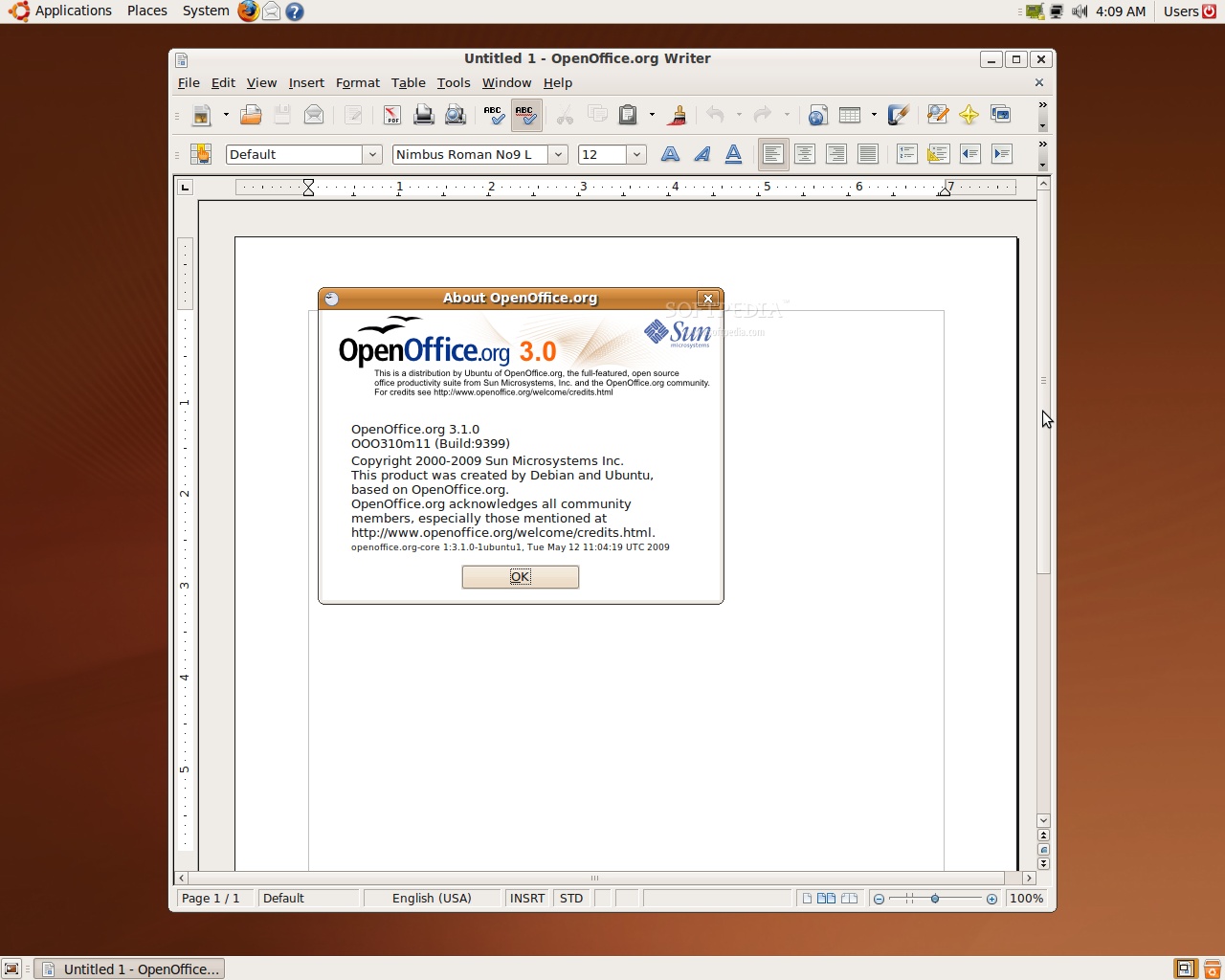
As the development team did not prepare a Live CD for this first alpha version of Ubuntu 9.10, we had to install the Alternate edition. As you can see from the screenshots below, there's nothing new on the surface... the same wallpaper, same GNOME version as in Ubuntu 9.04. We've noticed that the "About Ubuntu" entry from the System menu dissapeared. Under the hood, some of the packages were updated, while most are the same builds as the ones in Jaunty Jackalope.
The kernel packages are at version 2.6.30-5.6, based on Linux kernel 2.6.30 RC5, and OpenOffice.org was updated to version 3.1.0. In Ubuntu 9.10, HAL (the Hardware Abstraction Layer) will be replaced by the new DeviceKit-power and udev-extras, for power management and Fn key maps on laptops. Last but not least, in order to repair the "Intel issues" from Ubuntu 9.04, the Intel video driver will be switched from the old (but stable) EXA acceleration method to the new (still in development) UXA acceleration method. Oh, and EXT3 is still the default filesystem and GCC 4.4 is now the default compiler.
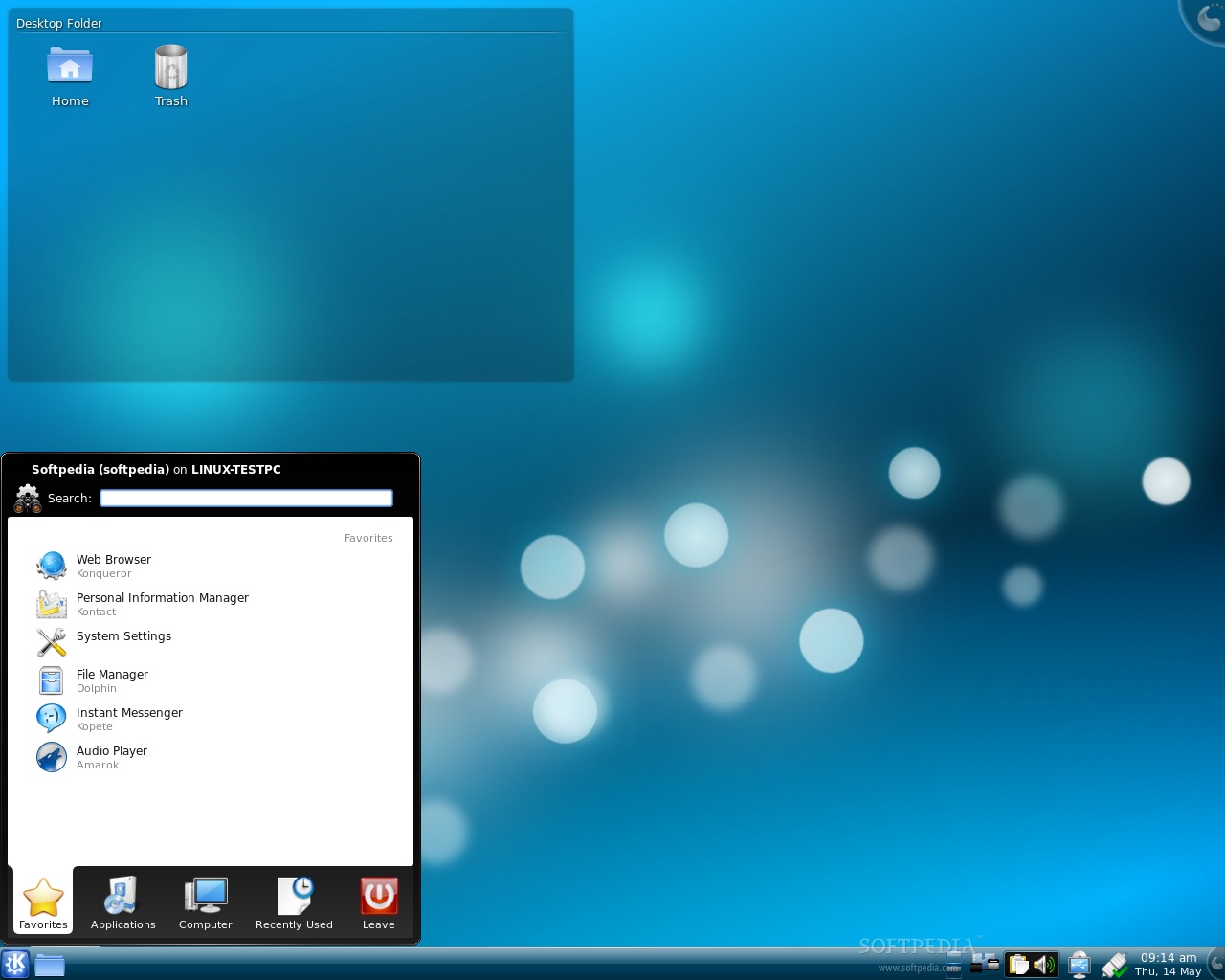
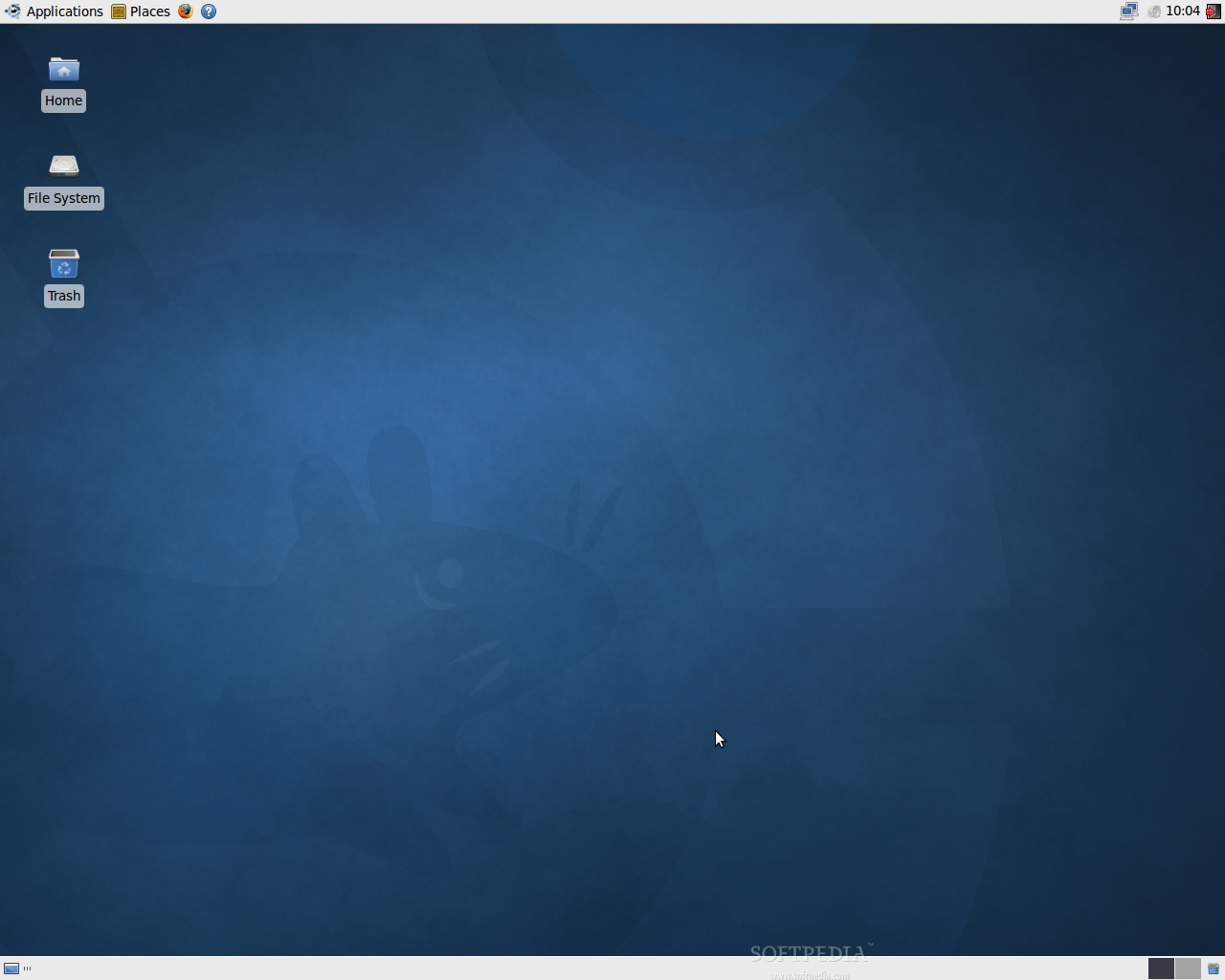
On the other hand, Kubuntu is built on top of the KDE 4.2.2 desktop environment and Xubuntu is using Xfce 4.6.
The system is fast as usual, with no major problems at the moment, except for the fact that the video drivers don't work, yet. As always, we did not expect something exciting from the first, and not even from the next two or three alpha versions of Ubuntu. Probably starting with the fifth or sixth alpha we will see some big changes, like that professional theme everyone is still waiting for, and which Mark Shuttleworth promised us.
On October 29th, Ubuntu 9.10 (Karmic Koala) will be the eleventh release of the Ubuntu operating system. However, until then, we have another version that should attract our attention and invade our computers, Ubuntu 9.04 (Jaunty Jackalope). See you again in about one month, on June 11, for the second Alpha release of the upcoming Ubuntu 9.10 (Karmic Koala).
The Karmic Koala Release Schedule:
May 14th, 2009 - Alpha 1 release
June 11th, 2009 - Alpha 2 release
July 23rd, 2009 - Alpha 3 release
August 13th, 2009 - Alpha 4 release
September 3rd, 2009 - Alpha 5 release
September 17th, 2009 - Alpha 6 release
October 1st, 2009 - Beta release
October 22nd, 2009 - Release Candidate
October 29th, 2009 - Final release of Ubuntu 9.10
source :news.softpedia.com
first alpha release of Ubuntu 9.10, dubbed Karmic Koala, which is scheduled for release in late October this year, was uploaded a few minutes ago on the official mirrors. As usual, we've downloaded a copy of it, and we intend to keep you up to date with the latest changes in the Ubuntu 9.10 development.
As the development team did not prepare a Live CD for this first alpha version of Ubuntu 9.10, we had to install the Alternate edition. As you can see from the screenshots below, there's nothing new on the surface... the same wallpaper, same GNOME version as in Ubuntu 9.04. We've noticed that the "About Ubuntu" entry from the System menu dissapeared. Under the hood, some of the packages were updated, while most are the same builds as the ones in Jaunty Jackalope.
The kernel packages are at version 2.6.30-5.6, based on Linux kernel 2.6.30 RC5, and OpenOffice.org was updated to version 3.1.0. In Ubuntu 9.10, HAL (the Hardware Abstraction Layer) will be replaced by the new DeviceKit-power and udev-extras, for power management and Fn key maps on laptops. Last but not least, in order to repair the "Intel issues" from Ubuntu 9.04, the Intel video driver will be switched from the old (but stable) EXA acceleration method to the new (still in development) UXA acceleration method. Oh, and EXT3 is still the default filesystem and GCC 4.4 is now the default compiler.
On the other hand, Kubuntu is built on top of the KDE 4.2.2 desktop environment and Xubuntu is using Xfce 4.6.
 |
The system is fast as usual, with no major problems at the moment, except for the fact that the video drivers don't work, yet. As always, we did not expect something exciting from the first, and not even from the next two or three alpha versions of Ubuntu. Probably starting with the fifth or sixth alpha we will see some big changes, like that professional theme everyone is still waiting for, and which Mark Shuttleworth promised us.
 |
On October 29th, Ubuntu 9.10 (Karmic Koala) will be the eleventh release of the Ubuntu operating system. However, until then, we have another version that should attract our attention and invade our computers, Ubuntu 9.04 (Jaunty Jackalope). See you again in about one month, on June 11, for the second Alpha release of the upcoming Ubuntu 9.10 (Karmic Koala).
 |
The Karmic Koala Release Schedule:
June 11th, 2009 - Alpha 2 release
July 23rd, 2009 - Alpha 3 release
August 13th, 2009 - Alpha 4 release
September 3rd, 2009 - Alpha 5 release
September 17th, 2009 - Alpha 6 release
October 1st, 2009 - Beta release
October 22nd, 2009 - Release Candidate
October 29th, 2009 - Final release of Ubuntu 9.10
 |
source :news.softpedia.com
Saturday, April 25, 2009
Windows XP Mode' revealed for Windows 7

Remember that major announcement that was planned for Windows 7 a while back? Well, it's finally here, revealed on Paul Thurrott's Windows SuperSite. So, what is it? It's a feature of Windows 7 called 'Windows XP Mode'.
So, what exactly is this new mode? As you can probably tell from the name, it's a method to provide better compatibility in Windows 7, and to pull it off with as little trouble as possible. It's also dubbed XPM, or formerly Virtual XP. According to Thurrott, "XPM is built on the next generation Microsoft Virtual PC 7 product line, which requires processor-based virtualization support (Intel and AMD) to be present and enabled on the underlying PC, much like Hyper-V, Microsoft's server-side virtualization platform. However, XPM is not Hyper-V for the client. It is instead a host-based virtualization solution like Virtual PC; the hardware assistance requirement suggests this will be the logical conclusion of this product line from a technological standpoint. That is, we fully expect future client versions of Windows to include a Hyper-V-based hypervisor."
XP Mode will bring a Virtual PC-based environment, as well as a fully licensed version of Windows XP SP3, free for all owners of Windows 7 Professional, Enterprise and Ultimate editions. This is good from a commercial point of view. Earlier, Microsoft could happily say that Windows 7 was just as compatible with software as Windows Vista, but now they can add 100% compatibility with Windows XP, too. So, for you IE6 users, you're in luck. Do not expect this to run like a proper Virtual PC; that being, a separate operating system running within a window. XP Mode will integrate itself with the Windows 7 desktop, and so the older software will run just like a normal Windows 7 application. Essentially, this is two operating systems running under an updated desktop.
Thurrott expects to have screenshots up of it running shortly, and also look forward to seeing an in-depth guide of it on Within Windows very soon. Neowin will publish more information as it arrives. Thoughts?
Other Article:
- How to Change the Windows 7 Default Control Panel View
- How to Customize the View in the Services Window in Windows 7
- Free Windows 7 Transformation Pack Download
- Free Windows 7 Themes For Vista and XP
- 20 New Features of Windows 7
- Free Download UxTheme Patch for Windows 7
Sam Symons - neowin.net
Saturday, April 18, 2009
Antitrust regulators won't scrutinize post-Windows 7 OS
Federal and state regulators have struck a deal with Microsoft that any version of Windows released after May 2011 will not be subject to the scrutiny mandated by a 2002 antitrust settlement.
As previously promised, however, Windows 7, will be put under the microscope.
Thursday, the Department of Justice (DOJ) filed documents (download PDF) with U.S. District Court Judge Colleen Kollar-Kotelly asking that she extend her oversight by at least 18 months, until May 12, 2011, to give Microsoft more time to finish documenting the communication protocols needed by competitors to craft software that works smoothly with Windows clients and servers.
Although Microsoft has consented to the extension -- and acknowledged that the regulators can later ask for another 18 months -- Kollar-Kotelly must approve the request.
The two sides have also agreed to clarify the status of future versions of Windows, the documents revealed.
The plaintiffs -- the DOJ and the various states that participated in the 2002 settlement -- disavowed any future extension request solely because of an impending Windows upgrade. "Plaintiffs and Microsoft have agreed to a clarifying modification of Section V.A that makes clear that the pending release of a new version of Windows will not provide grounds for Plaintiffs to exercise their right to seek a further extension of the Final Judgments for up to eighteen additional months beyond May 12, 2011," the papers stated.
Originally, the consent decree Microsoft signed was to expire in November 2007. But several states objected, and after months of legal back-and-forth, Kollar-Kotelly in January 2008 extended her oversight by another two years, to Nov. 12, 2009. At that time, however, she left the door open to continued monitoring, and Microsoft agreed that she could extend it for up to three more years, to Nov. 12, 2012. Microsoft and the states and federal officials also came to an agreement about future editions of Windows and the 2002 judgment.
By Gregg Keizer
source : infoworld
As previously promised, however, Windows 7, will be put under the microscope.
Thursday, the Department of Justice (DOJ) filed documents (download PDF) with U.S. District Court Judge Colleen Kollar-Kotelly asking that she extend her oversight by at least 18 months, until May 12, 2011, to give Microsoft more time to finish documenting the communication protocols needed by competitors to craft software that works smoothly with Windows clients and servers.
Although Microsoft has consented to the extension -- and acknowledged that the regulators can later ask for another 18 months -- Kollar-Kotelly must approve the request.
The two sides have also agreed to clarify the status of future versions of Windows, the documents revealed.
The plaintiffs -- the DOJ and the various states that participated in the 2002 settlement -- disavowed any future extension request solely because of an impending Windows upgrade. "Plaintiffs and Microsoft have agreed to a clarifying modification of Section V.A that makes clear that the pending release of a new version of Windows will not provide grounds for Plaintiffs to exercise their right to seek a further extension of the Final Judgments for up to eighteen additional months beyond May 12, 2011," the papers stated.
Originally, the consent decree Microsoft signed was to expire in November 2007. But several states objected, and after months of legal back-and-forth, Kollar-Kotelly in January 2008 extended her oversight by another two years, to Nov. 12, 2009. At that time, however, she left the door open to continued monitoring, and Microsoft agreed that she could extend it for up to three more years, to Nov. 12, 2012. Microsoft and the states and federal officials also came to an agreement about future editions of Windows and the 2002 judgment.
By Gregg Keizer
source : infoworld
Friday, April 17, 2009
New Leopard 10.5.7 build released, public release imminent?

Apple has released another build of the upcoming 10.5.7 operating system, which builds on the existing Leopard iteration, to developers and many people are whispering that a release is coming very, very soon. The news comes from AppleInsider, who states that developers have been getting weekly betas for nearly two months, the most recent of which being late Tuesday. There are a few signs that the release is coming soon, one of which being extremely frequent builds that only fix one or two issues at a time. This is a sign they're just hunting and killing minor bugs as they find them, and that development is closing up.
Mac OS X 10.5.7 brings with it 108 documented code corrections, and is currently in it's seventh week of testing. It will bring with it updates to 20 of the core OS X components, such as iCal, MobileMe syncing, networking and Time Machine, as well as bringing an updated speech dictionary. There has been another indication that it is arriving soon, and that is that iMacs equipped with ATI Radeon HD 4850 are shipping very shortly, or in some cases have begun shipping. It was thought that these graphics card required the 10.5.7 update, but as AppleInsider mentioned, this isn't exactly confirmed.
The update is expected to hit around 443 megabytes, and it will be a delta one meaning there will be no operating system reinstall needed. There's no official release date yet, but if you've read the article, you should expect one very soon.
source : neowin
Sunday, March 22, 2009
Windows 7 Build 7057 Overview
Well folks, here we are again, another leak of Windows 7. This time we have build 7057.winmain.090305-2000. This build is a mere 6 days old as of this writing and brings forth a few changes since build 7048. I will outline these changes here as well as over a few other things.
UAC Issue
As you all know, previous builds of Windows 7 allowed you to change the level of UAC without ever receiving a prompt from the system. This could potentially allow a piece of malware to turn off UAC on your system and open it up to a much more lethal attack. This issue was not fixed in 7048 which surprised me, but it IS fixed in 7057. Hooray!
New Logon Screen
Upon first boot of this build you will notice the most obvious change over 7048. The logon screen is new. At first when I saw the screenshot I didn’t think I liked it, but after seeing it running it is pretty nice, although it might be a little too bright in some areas. See the screenshot below to have a look at the logon screen:
7057boot
New Wallpapers
This build contains some new wallpapers over 7048. They seem to be centered around the “Characters” theme which is clearly geared towards little kids. Can’t say I’ll be using these but I’m sure they will make the 4 year old from the Windows Live commercials very happy. See screenshot below to see new wallpapers:
wallpapers
New User Pictures
This build features all new user pictures to be used for your account on the system. Some of these are quite nice and there are more than double the number that were present in Vista and previous builds of Windows 7. See the screenshot below:
user_pics
Expiration Date Change
This build, in preparation for the RC, has an expiration date which is set to March 1, 2010. I have already seen people reading into this WAY too much stating that this must mean Microsoft won’t release Windows 7 until early 2010. I can assure you all that this expiration date is merely there to give people ample time to get retail bits before their RC build expires.
winver
Startup Bug, Desktop.ini Opens in Notepad on Every Boot – FIX
This is an odd bug, mostly due to the fact that some instances of desktop.ini are visible and not set to system and hidden. Fortunately the fix for this is quite easy:
1.
Navigate to C:\ProgramData\Microsoft\Windows\Start Menu\Programs\Startup
2.
Delete desktop.ini
3.
Navigate to C:\Users\USERNAME\AppData\Roaming\Microsoft\Windows\Start Menu\Programs\Startup
4.
Delete desktop.ini if present.
That pretty much covers it, a small overview of the changes in 7057. Any questions or comments feel free to ask or discuss it in the comments.
Other Article:
- How to Change the Windows 7 Default Control Panel View
- How to Customize the View in the Services Window in Windows 7
- Free Windows 7 Transformation Pack Download
- Free Windows 7 Themes For Vista and XP
- 20 New Features of Windows 7
- Free Download UxTheme Patch for Windows 7
source : chris123nt
UAC Issue
As you all know, previous builds of Windows 7 allowed you to change the level of UAC without ever receiving a prompt from the system. This could potentially allow a piece of malware to turn off UAC on your system and open it up to a much more lethal attack. This issue was not fixed in 7048 which surprised me, but it IS fixed in 7057. Hooray!
New Logon Screen
Upon first boot of this build you will notice the most obvious change over 7048. The logon screen is new. At first when I saw the screenshot I didn’t think I liked it, but after seeing it running it is pretty nice, although it might be a little too bright in some areas. See the screenshot below to have a look at the logon screen:
7057boot
New Wallpapers
This build contains some new wallpapers over 7048. They seem to be centered around the “Characters” theme which is clearly geared towards little kids. Can’t say I’ll be using these but I’m sure they will make the 4 year old from the Windows Live commercials very happy. See screenshot below to see new wallpapers:
wallpapers
New User Pictures
This build features all new user pictures to be used for your account on the system. Some of these are quite nice and there are more than double the number that were present in Vista and previous builds of Windows 7. See the screenshot below:
user_pics
Expiration Date Change
This build, in preparation for the RC, has an expiration date which is set to March 1, 2010. I have already seen people reading into this WAY too much stating that this must mean Microsoft won’t release Windows 7 until early 2010. I can assure you all that this expiration date is merely there to give people ample time to get retail bits before their RC build expires.
winver
Startup Bug, Desktop.ini Opens in Notepad on Every Boot – FIX
This is an odd bug, mostly due to the fact that some instances of desktop.ini are visible and not set to system and hidden. Fortunately the fix for this is quite easy:
1.
Navigate to C:\ProgramData\Microsoft\Windows\Start Menu\Programs\Startup
2.
Delete desktop.ini
3.
Navigate to C:\Users\USERNAME\AppData\Roaming\Microsoft\Windows\Start Menu\Programs\Startup
4.
Delete desktop.ini if present.
That pretty much covers it, a small overview of the changes in 7057. Any questions or comments feel free to ask or discuss it in the comments.
Other Article:
- How to Change the Windows 7 Default Control Panel View
- How to Customize the View in the Services Window in Windows 7
- Free Windows 7 Transformation Pack Download
- Free Windows 7 Themes For Vista and XP
- 20 New Features of Windows 7
- Free Download UxTheme Patch for Windows 7
source : chris123nt
Wednesday, January 21, 2009
Microsoft Tweaks Hardware Ratings For Windows 7

Microsoft says it has included new PC configurations in its hardware ratings for Windows 7. The Windows Experience Index has two more categories than the ratings for Windows Vista and 7.9 is now the highest score. Microsoft said the WEI now includes new technologies, including sold-state drives, multi-core processors, and graphics adapters
Microsoft
 says it has tweaked its Windows Experience Index (WEI) for Windows 7 to take into account new PC hardware configurations. Introduced with Windows Vista, Microsoft's PC rating system is compiled by measuring the relative capabilities and configuration of each machine's components.
 The goal of WEI is to help consumers buy hardware, programs and software matched to their computer's score. The WEI does not measure the interactions of components under a software load, but rather characteristics of the hardware, noted Microsoft Senior Vice President Steven Sinofsky.
"As such it does not -- nor cannot -- measure how a system will perform under your own usage scenarios," Sinofsky said. "Thus the WEI does not measure performance of a system, but merely the relative hardware capabilities when running Windows 7."
WEI Scoring
For Vista and Windows 7, the five areas scored include processor, memory, general desktop graphics, gaming graphics, and primary hard disk.
"The overall Windows Experience Index is defined to be the lowest of the five top-level WEI subscores, where each subscore is computed using a set of rules and a suite of system assessment tests," said Michael Fortin, an engineer in Microsoft's Windows Core Operating Systems Division.
PC buyers will be able to follow some general guidelines to understand the experiences that a PC with a given score range can be expected to deliver. "These Vista-era general guidelines for systems in the 1.0, 2.0, 3.0, 4.0 and 5.0 ranges still apply to Windows 7," Fortin said.
Though the scoring areas for Windows 7 are the same as Vista, the actual rules for scoring devices have changed "to reflect experience and feedback comparing closely rated devices with differing quality," Fortin explained. This makes the WEI more indicative of actual use, he said.
New Levels
Moreover, scoring levels 6.0 and 7.0 have been added to Windows 7 -- with 7.9 the maximum possible score. The two new levels were designed to capture the rather substantial improvements seen in key technologies as they enter the mainstream, including solid-state disks, multi-core processors, and higher-end graphics adapters, Fortin said. The amount of memory in a system is also a factor.
"Of course, adding new levels doesn't explain why a Vista system or component that used to score 4.0 or higher is now obtaining a score of 2.9," Fortin said. "In most cases, large score drops will be due to the addition of some new disk tests in Windows 7."
For gaming users, Microsoft expects systems with gaming graphics scores in the 6.0 to 6.9 range to support DX10 graphics and deliver video at frame rates of 40 to 50 fps and a resolution of 1280x1024 pixels, Fortin said. "In the range of 7.0 to 7.9, we would expect higher frame rates at even higher screen resolutions," he added.
Microsoft's new WEI scores also are intended to help game developers decide how best to scale their experience on a given system.
"Graphics is an area where there is both the widest variety of scores readily available in hardware and also the widest breadth of expectations," Fortin said. "The extremes at which CAD, HD video, photography and gamers push graphics compared to the average business user or a consumer -- doing many of these same things as an avocation rather than vocation -- is significant."
source : toptechnews.com
Other related articles :
- Windows 7 will be in a free by Microsoft
- How to Change the Windows 7 Default Control Panel View
- How to Customize the View in the Services Window in Windows 7
- Free Windows 7 Transformation Pack Download
- Free Windows 7 Themes For Vista and XP
- 20 New Features of Windows 7
- Free Download UxTheme Patch for Windows 7
source : toptechnews.com
Other related articles :
- Windows 7 will be in a free by Microsoft
- How to Change the Windows 7 Default Control Panel View
- How to Customize the View in the Services Window in Windows 7
- Free Windows 7 Transformation Pack Download
- Free Windows 7 Themes For Vista and XP
- 20 New Features of Windows 7
- Free Download UxTheme Patch for Windows 7
Tuesday, January 13, 2009
Apple: 10 Things It Needs To Do In 2009

Its Mac OS X operating system, App Store, iPhone, notebooks, and other hardware all get good marks, but they could be improved upon. Here's how.\
Like the rest of the business world, Apple is embarking on treacherous times in 2009. But Apple faces special challenges: It sells boutique products that cost more than the competition.
However, Apple also has special strengths: Those same products cost more because they're better, and Apple has a fiercely loyal customer base.
To help Apple successfully navigate the turbulent financial waters, here are 10 pieces of advice on what the company needs to do with its operating system, iPhone, App Store, hardware, marketing, and more.
1. Build A Moat Around Apple Headquarters, Fill It With Crocodiles
Apple set off a bit of a foofaraw in December when it announced it was pulling out of the Macworld conference. The decision set off a wave of theorizing why they were doing it. But the real reason is pretty simple.
CEO Steve Jobs's role model is Willy Wonka. He wants to lock himself up in Apple's Cupertino headquarters and not have to talk to people anymore.
Macworld Expo is expensive, and Apple just wasn't getting the payback for it.
More importantly, Macworld Expo is outside of Apple's control; it's run, not by Apple, but by International Data Group (which competes with InformationWeek's parent company, United Business Media). The Apple community expects a big announcement out of the conference, and Apple would rather roll out announcements on its own schedule.
Moreover, Macworld gives customers and developers Uncontrolled communication with Apple, and Apple hates that, says John Welch, an IT manager, blogger, and sometime InformationWeek contributor, in a profanity-laced blog post. Apple "HATES unmanaged random customer contact," Welch says, and clarifies: "Apple doesn't want to talk to you. Apple has never wanted to talk to you."
Apple wants to limit its contact with customers to the Internet and to the Apple Stores, which are as orchestrated as Disneyland, Welch says. Developers get access to Apple at the Apple-run Worldwide Developers Conference in the summer.
Welch is right -- but I don't think he goes far enough. Apple doesn't just want to control contact with customers and developers, it wants to eliminate that contact entirely -- except for the contact involving customers handing over their credit cards and walking off with merchandise.
Indeed, Steve Jobs doesn't want contact with anyone -- not even Apple employees.
And that's the real reason Steve Jobs didn't attend Macworld this year. He hinted he skipped it for health reasons. But the real reason is that he's on an overseas excursion, looking for Oompa Loompas he can replace Apple's employees with.
Then, Jobs can build a big, wrought-iron fence around Apple's headquarters and chain and padlock the gate shut. After that, nothing will ever be seen going into Apple headquarters, and the only things that'll come out are Wonka Bars and Everlasting Gobstoppers Macs, iPhones, and iPods. Forever.
source : InformationWeek
Sunday, January 4, 2009
Israel brings Gaza airstrikes to the Web
The Israel Defense Forces this week extended its airstrikes on Gaza to the Web, posting video footage of its air assault against Hamas militants on YouTube and using Twitter to spread its message.
According to various news reports, the Israel Defense Forces (IDF) created its own YouTube channel carrying videos that include black-and-white aerial footage of attacks on Hamas weapon sites, and clips of Hamas terrorists loading rockets into trucks.
An IDF spokesperson said it is using the platform to "help us bring our message to the world," by offering "exclusive footage showing the IDF's operation success" in Gaza.
Israel launched its air assault on Gaza on December 27 in a move to stop Hamas militants from firing rockets into Israeli territory.
The New York Israeli Consulate also initiated a Twitter feed in an attempt to share its viewpoints with a younger audience, garnering more than 2,900 followers since its microblogging service was launched Monday.
Spokesperson for the consulate David Saranga, as quoted in a CNN report, said: "We saw that there is a big debate, a very vivid debate about the situation in Gaza, and we wanted to bring our point of view. We wanted to share it with people on Twitter.
"We wanted to outreach to the young generation, who does not read the conventional media, but is still interested in events in the Middle East, so we thought this is a good way to be an official voice for the questions people are asking," Saranga said.
Videos removed, reinstated
Some of the IDF's videos on YouTube were removed, presumably due to a policy on the video-sharing site that prohibits "inappropriate content." The site provides a feature that allows users to flag videos as unsuitable, and such content will be removed if it is deemed to violate YouTube's guidelines.
Some clips, however, were later reinstated.
While not commenting directly on the IDF videos, YouTube's policy chief Victoria Grand said in the CNN report: "Occasionally, a video flagged by users is mistakenly taken down. When this is brought to our attention, we review the content and take appropriate action, which may include restoring videos that had been removed."
The IDF said in a statement on its YouTube channel: "We are saddened that YouTube has taken down some of our exclusive footage.
"As the state of Israel again faces those who would see it destroyed, it is imperative that we in the IDF show the world the inhumanity directed against us and our efforts to stop it."
According to FoxNews.com, Israel plans to launch an independent blog where videos can be viewed without any restrictions.
Eileen Yu reported for ZDNet Asia.
Saturday, December 27, 2008
20 New Features of Windows 7
Many have no patience to wait out the Windows 7 (W7), successor of Windows Vista. Not as Microsoft keep many new features W7, but semiua confidentiality has expired, Microsoft gives developers a lot about the leak leak-W7 in the PDC. TTehcnologizer the opportunity to try W7 seems that the OS is ...really quite prospective!
First, you must know that the W7 will not have a drastic change in terms of software architecture as Vista from XP - Microsoft have promised that the users meakukan upgrade from Vista will not have compatibility problems. Because the W7 does not change much in the background screen, Microsoft can focus on the development experience of the use of the OS itself and not on various technical aspects such as security and stability.
Most of the changes that are packed W7 seeks to improve the ease and convenience of users, and below are some of the new features W7 has seen demonstrations in the Microsoft PDC.
Other Article:
- How to Change the Windows 7 Default Control Panel View
- How to Customize the View in the Services Window in Windows 7
- Run Windows 7 in Virtual PC
- Free Windows 7 Transformation Pack Download
- Free Windows 7 Themes For Vista and XP
- Free Download UxTheme Patch for Windows 7
First, you must know that the W7 will not have a drastic change in terms of software architecture as Vista from XP - Microsoft have promised that the users meakukan upgrade from Vista will not have compatibility problems. Because the W7 does not change much in the background screen, Microsoft can focus on the development experience of the use of the OS itself and not on various technical aspects such as security and stability.
Most of the changes that are packed W7 seeks to improve the ease and convenience of users, and below are some of the new features W7 has seen demonstrations in the Microsoft PDC.
Other Article:
- How to Change the Windows 7 Default Control Panel View
- How to Customize the View in the Services Window in Windows 7
- Run Windows 7 in Virtual PC
- Free Windows 7 Transformation Pack Download
- Free Windows 7 Themes For Vista and XP
- Free Download UxTheme Patch for Windows 7
2. Taskbar
The biggest gain since the first time in the debut of Windows 95. Windows 7 is no longer displays a small icon application complete with the name of the application, but only large icons similar to Mac OS X. List window that is displayed when placing a mouse on the icon in the application also replaced with the user interface (UI) "Ribbon" that displays thumbnail window that opens in sideways.
Other tools that are connected to the computer as the camera will also appear in the taskbar with windows applications. Altogether these features make Windows 7 to appear attractive.

Other tools that are connected to the computer as the camera will also appear in the taskbar with windows applications. Altogether these features make Windows 7 to appear attractive.
3. System Tray
Officially known as the "Notification Area," Microsoft finally allows users the tools to address the desktop area, which is often disorganized. Users can have any icons that are displayed in the System Tray, the icon to change the position and whether they are allowed to attract users with the notification.
4. Jump List
Jump menu list will appear in the Start Menu or when users click on one of the Taskbar application, provide several options on the user to perform various actions that supported the application. Figure below shows the jump list of Windows Media Player (WMP), which gives users the option to play the song, see the last songs played, and more.

5. User Account Control (UAC) Better
UAC is one of the features that most users of Windows Vista doghouse. Now besides the "On" and "Off," users can choose to UAC only appear when installing an application or an application to change the configuration of Windows only. Not yet known whether these changes enough to make the UAC from the enemy into a friend, but at least this change will make Windows more friendly UAC.

6. Performance
Microsoft said that they do a lot of changes to improve performance and stability of Windows 7, such as reducing the boot time to enable some applications in parallel, the new memory management methods and more. While this is still too early to discuss performance, we must await the arrival of the version that is almost finished to get him the means, but according to Technologizer, Windows 7 feels very quickly operated in a Dell laptop Microsoft loaned - and clean from the bloatware.
7. Stage Device
This new feature to collect all related peripherals in one place for easy user such as configuration, features, documentation services and even the purchase of printer ink and others.

8. Libraries
If you already know the concept of the library for songs such as the itunes, the concept of the library in Windows 7 also will not be foreign to you. This feature collects all the files on your PC to type in each library for easy management of the media. SFor example, all the images from all PC and the network will be collected in a photo library that can be accessed in one place like the image below.

9. HomeGroups
Windows 7 to introduce a new feature called HomeGroups network that aims to ease some of the computer network to share files and peripherals - as if all that is located on a PC the same. Although the features of Windows Networking since it is always the same aims, in fact configuration to use the network printer is still too difficult for most users.
10. "Peeking" (tout)
Peeking features in Windows 7 easier for users to quickly read the content in one window without the need to interact with the window. Placing mouse over the thumbnail window on the Task Bar will change all open windows except for a transparent window is selected. S In addition to "snoop" window applications users can also tout the Windows desktop.

11.Sidebar Not Used More
Jika dibandingkan dengan widget Mac OS X yang dapat ditempatkan di desktop , perbedaan paling mencolok dari gadget Microsoft adalah peletakannya pada sidebar di sebelah kanan layar. If compared with the Mac OS X widgets that can be placed on the desktop, most colorful difference from the Microsoft gadget is laying it sidebar on the right of the screen. In W7, the sidebar is removed because they use too many places there and the gadget can now be placed directly on the desktop. Despite this fact can also be done in Vista.
12. ITunes Compatibility
W WMP format now supports two media favorite Apple: AAC for audio and H.264 for video. WMP also can find the iTunes library on the existing network and play the content. Apple Fairplay DRM is not supported, but somehow I play a video podcast that beresolusi sizable visible in the bad WMP.

13. WMP is minimal
Ke When you right-click on a media file in Windows Explorer and use WMP to play, WMP will appear in a minimalist mode that does not dominate your desktop. You also can play the media preview pane in Windows Explorer without the need to launch the WMP at all.

14. Streaming Multimedia
W7 add features delivery media files from PC to the various tools that support streaming music such as the Sonos system through the network. Microsoft said that the W7 will change to the file in a format that can be played by your media player. This also means that Microsoft is again approaching the last aspiration Bill Gates made the Windows media center at home. . Media Center version of Windows 7 also get a big upgrade.

15. Automatic window settings
Slide window near the edge of the right or left of the window will directly change the size of a half screen. This is intended to facilitate you arrange two windows side by side in (such as the browser or Word documents) so you can easily work on the two windows at once.
16. Finding An All Places
W7 feature named "Search Federation" allows you to mengikutkan various computer, network and storage media sites to search in Windows 7.

17. Themes
Microsoft is no longer deliver major changes in features in Windows customize the theme. Di W7 In W7 Microsoft provides a new theme that voters better with the preview feature in the original size and allow you to save custom themes with just a few clicks. Microsoft also plans to change the name of a Themes Styles.

18. Windows Live
Officially, Microsoft has little to fix the applications on the W7, does not like Vista. Applications Photo Gallery, Movie Maker and email has been downloaded for free to be called Windows Live Esentials, although Microsoft still hopes the various PC vendors will resemble the Windows Live Essentials, in which they sell.

19. New Paint
Windows Paint is a lot to remember to get big upgrade, now appear with the Ribbon UI of Office 2007 that has now become standard in many Microsoft applications. Although many consider Paint.net as an alternative replacement for Paint better.

20. Touch Screen Features
Windows 7 is the first version of Windows that supports multi-touch that allows you to control the OS with both hands. Many still doubt whether the multi-touch will merevolusi the PC world as he merevolusi world's mobile phone. Currently there are almost no PC outstanding in the market that supports features touch screen other than the TouchSmart from HP and Dell Latitude XT. (via Technologizer )
source :udaramaya.com
source :udaramaya.com


